> ## Documentation Index
> Fetch the complete documentation index at: https://docs.quickscope.gg/llms.txt
> Use this file to discover all available pages before exploring further.
# Context & Filtering
> Control what data widgets display
Many widgets display data for a specific token or wallet. This is the **context**. Here's how to control what each widget shows.
## Setting Context
* Use the search bar in the widget header
* Click a token anywhere to set it as context
* Select from tracked wallets in the dropdown
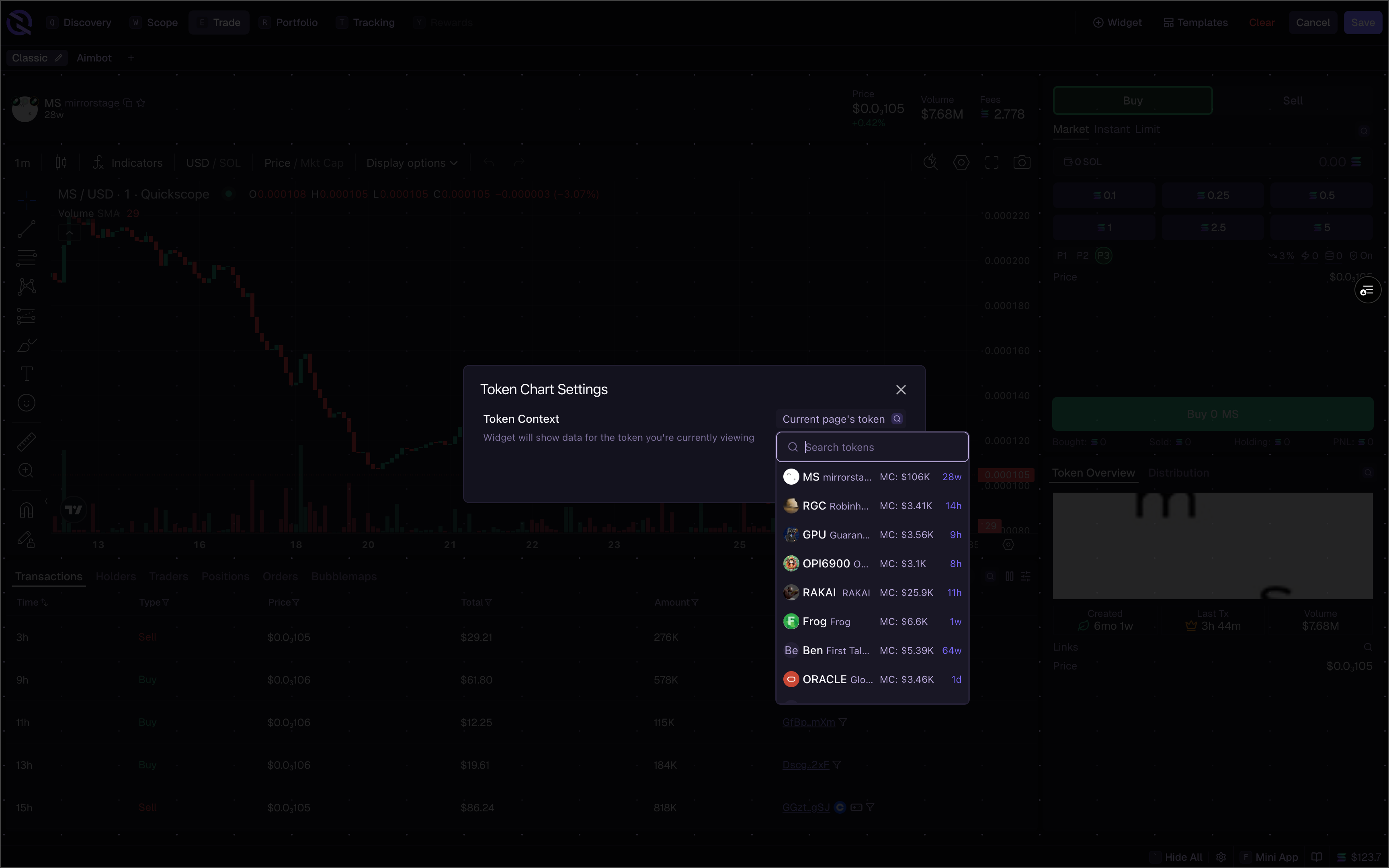 ## Token Context
By default, widgets show data for the token page you're currently viewing, or the last token page you visited.
To pin a widget to a specific token:
1. Click the **gear icon** on the widget
2. Find **Token Context**
3. Search for and select a specific token
This lets you have one chart following your current token while another stays pinned to something you're monitoring.
## Wallet Context
Wallet widgets default to your connected wallet (or multiple wallets in a multi-wallet setup).
To view a different wallet:
1. Click the **gear icon** on the widget
2. Find **Wallet Context**
3. Search for any wallet address
Multiple widgets on the same page can have different contexts. A Positions widget showing your wallet can sit next to a Token Holders widget showing a different wallet.
## Filtering
Filter data within any table widget by clicking the **filter icon** on the widget header. Filters are available on every token table – Scope, Trending, New Pairs, and any custom table widget.
## Token Context
By default, widgets show data for the token page you're currently viewing, or the last token page you visited.
To pin a widget to a specific token:
1. Click the **gear icon** on the widget
2. Find **Token Context**
3. Search for and select a specific token
This lets you have one chart following your current token while another stays pinned to something you're monitoring.
## Wallet Context
Wallet widgets default to your connected wallet (or multiple wallets in a multi-wallet setup).
To view a different wallet:
1. Click the **gear icon** on the widget
2. Find **Wallet Context**
3. Search for any wallet address
Multiple widgets on the same page can have different contexts. A Positions widget showing your wallet can sit next to a Token Holders widget showing a different wallet.
## Filtering
Filter data within any table widget by clicking the **filter icon** on the widget header. Filters are available on every token table – Scope, Trending, New Pairs, and any custom table widget.
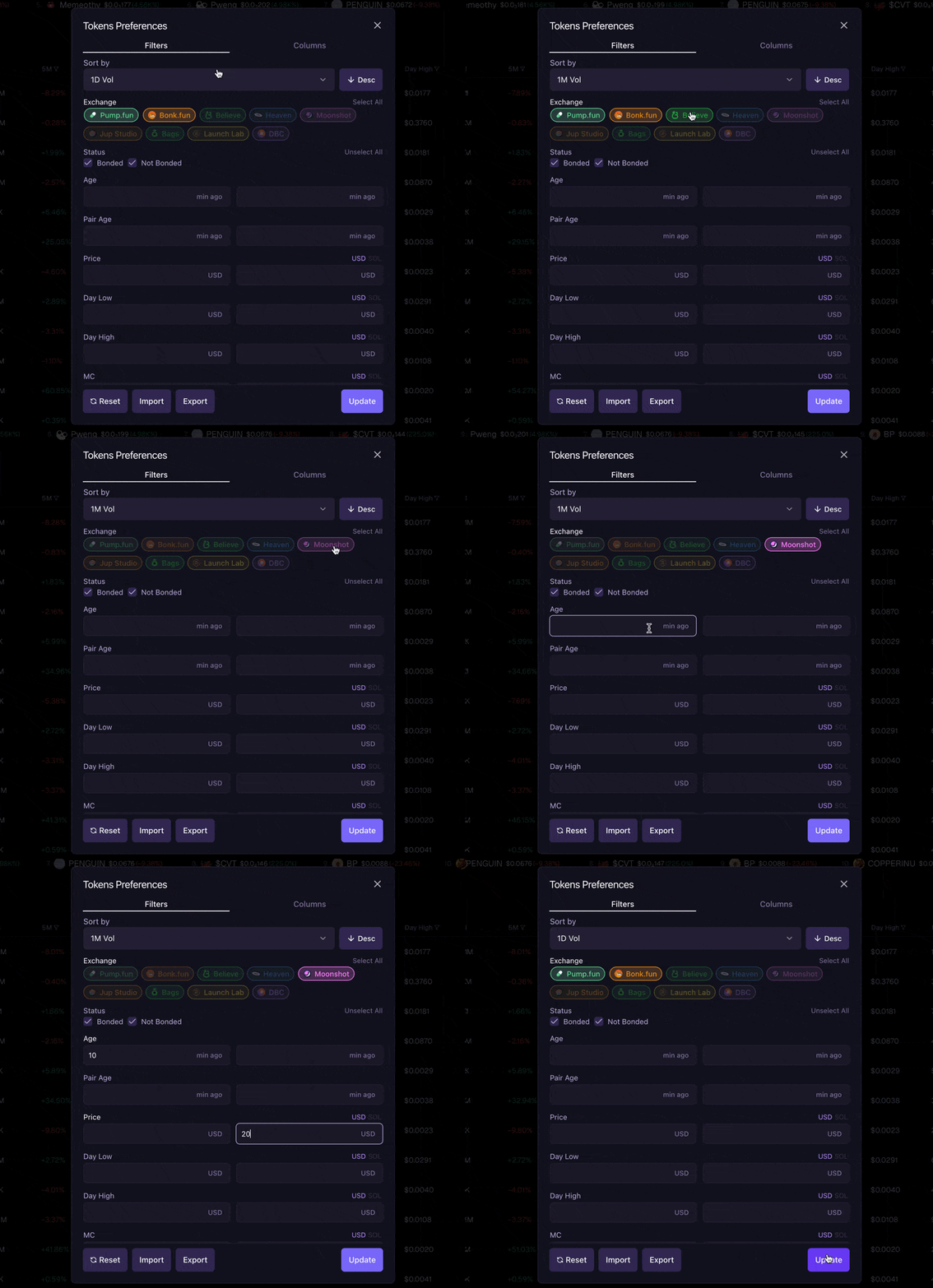 ### Quick Column Filters
Click the filter icon next to any column header for temporary filtering. These filters reset on refresh or tab change.
### Quick Column Filters
Click the filter icon next to any column header for temporary filtering. These filters reset on refresh or tab change.
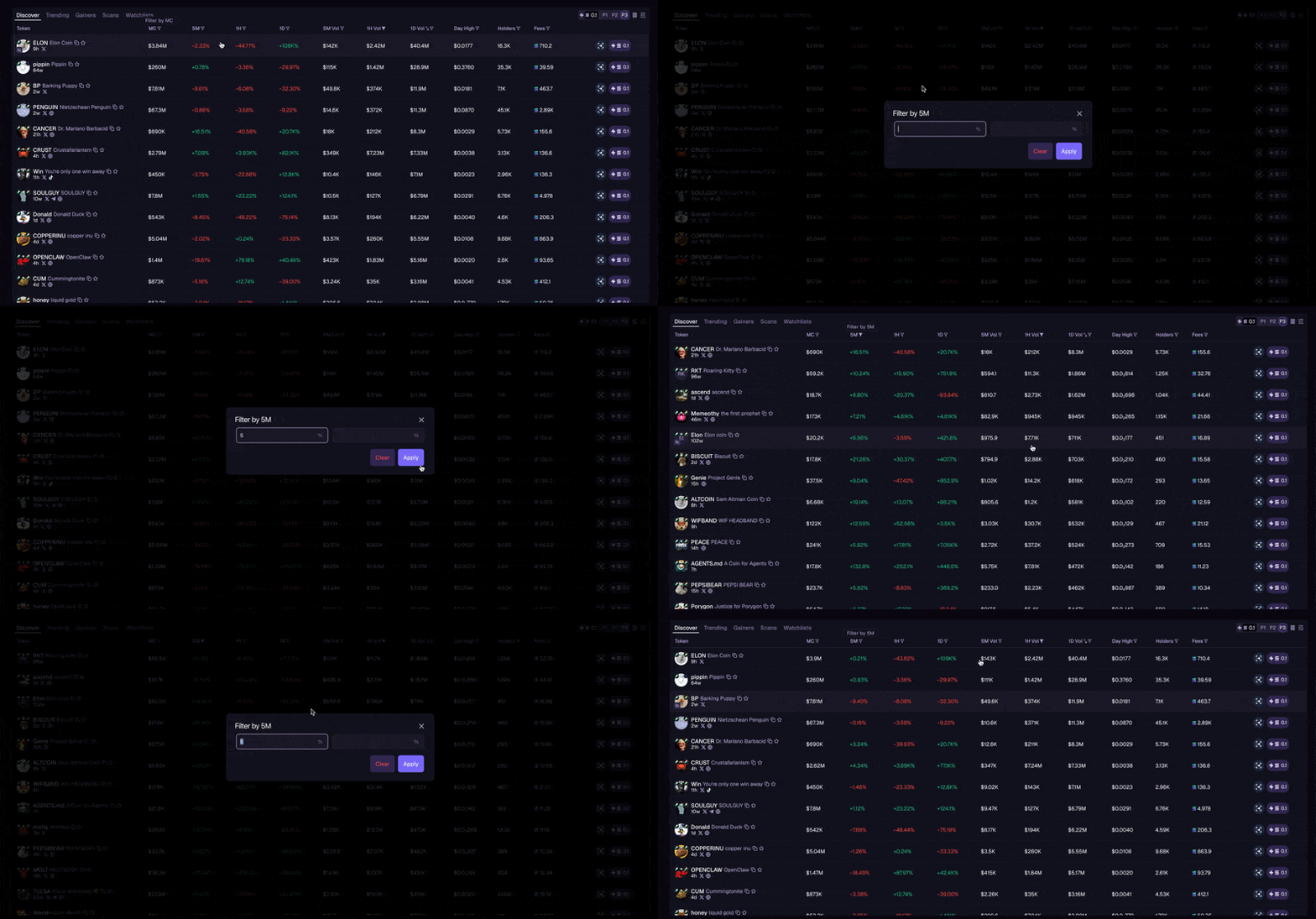 ### Tokens Preferences
Open Tokens Preferences from the filter panel to configure persistent filters across five tabs. Use **Import/Export** to share filter presets, or **Reset All** to restore defaults.
These filters apply to all token tables. Changes persist across sessions.
#### General
| Filter | Options |
| ------------------- | -------------------------------------------------------------------------------- |
| **Sort By** | Any available column, ascending or descending |
| **Exchange** | Pump.fun, Bonk.fun, Believe, Heaven, Moonshot, Jup Studio, Bags, Launch Lab, DBC |
| **Status** | Bonded, Not Bonded |
| **Launch Settings** | Mayhem Mode, Cashback |
**Launch Settings** reflect how a token's creator configured fees on Pump.fun. **Mayhem Mode** tokens return a portion of trading fees to traders as cashback. **Cashback** tokens direct fees to the creator instead. Creators choose one option before launch – the choice is permanent.
#### Socials
| Filter | Type |
| ----------------------- | ----------------------- |
| **Dex Paid** | Toggle |
| **At Least One Social** | Toggle |
| **X/Twitter** | Toggle |
| **Website** | Toggle |
| **Telegram** | Toggle |
| **Scan Range** | 1M, 5M, 15M, 1H, 6H, 1D |
#### Market
All market filters accept min/max ranges. Price, Volume, Fees, and ATH support a USD/SOL toggle.
| Filter | Filter | Filter |
| ---------- | ------- | -------- |
| Price | Day Low | Day High |
| MC | 1M Vol | 5M Vol |
| 1H Vol | 6H Vol | 1D Vol |
| Total Vol | 1M % | 5M % |
| 1H % | 6H % | 1D % |
| Progress % | Fees | ATH |
#### Holders
All holder filters accept min/max ranges.
| Filter | Filter | Filter |
| -------------- | --------------- | ---------------- |
| Holders | Top 25% | Bot Holders |
| Sniper Holders | Bundler Holders | Coinbase Holders |
| Fomo Holders | Axiom Holders | Dev % |
#### Creation
All creation filters accept min/max ranges.
| Filter | Filter | Filter |
| ------ | -------- | ------ |
| Age | Pair Age | 1M Tx |
| 5M Tx | 1H Tx | 6H Tx |
| 1D Tx | Total Tx | |
## Related
* [Widgets](/terminal/workspace/widgets) – Widget types
* [Column Customization](/terminal/advanced/columns) – Column visibility and ordering
* [Finding Tokens](/discovery/finding-tokens) – Discovery workflows
### Tokens Preferences
Open Tokens Preferences from the filter panel to configure persistent filters across five tabs. Use **Import/Export** to share filter presets, or **Reset All** to restore defaults.
These filters apply to all token tables. Changes persist across sessions.
#### General
| Filter | Options |
| ------------------- | -------------------------------------------------------------------------------- |
| **Sort By** | Any available column, ascending or descending |
| **Exchange** | Pump.fun, Bonk.fun, Believe, Heaven, Moonshot, Jup Studio, Bags, Launch Lab, DBC |
| **Status** | Bonded, Not Bonded |
| **Launch Settings** | Mayhem Mode, Cashback |
**Launch Settings** reflect how a token's creator configured fees on Pump.fun. **Mayhem Mode** tokens return a portion of trading fees to traders as cashback. **Cashback** tokens direct fees to the creator instead. Creators choose one option before launch – the choice is permanent.
#### Socials
| Filter | Type |
| ----------------------- | ----------------------- |
| **Dex Paid** | Toggle |
| **At Least One Social** | Toggle |
| **X/Twitter** | Toggle |
| **Website** | Toggle |
| **Telegram** | Toggle |
| **Scan Range** | 1M, 5M, 15M, 1H, 6H, 1D |
#### Market
All market filters accept min/max ranges. Price, Volume, Fees, and ATH support a USD/SOL toggle.
| Filter | Filter | Filter |
| ---------- | ------- | -------- |
| Price | Day Low | Day High |
| MC | 1M Vol | 5M Vol |
| 1H Vol | 6H Vol | 1D Vol |
| Total Vol | 1M % | 5M % |
| 1H % | 6H % | 1D % |
| Progress % | Fees | ATH |
#### Holders
All holder filters accept min/max ranges.
| Filter | Filter | Filter |
| -------------- | --------------- | ---------------- |
| Holders | Top 25% | Bot Holders |
| Sniper Holders | Bundler Holders | Coinbase Holders |
| Fomo Holders | Axiom Holders | Dev % |
#### Creation
All creation filters accept min/max ranges.
| Filter | Filter | Filter |
| ------ | -------- | ------ |
| Age | Pair Age | 1M Tx |
| 5M Tx | 1H Tx | 6H Tx |
| 1D Tx | Total Tx | |
## Related
* [Widgets](/terminal/workspace/widgets) – Widget types
* [Column Customization](/terminal/advanced/columns) – Column visibility and ordering
* [Finding Tokens](/discovery/finding-tokens) – Discovery workflows