> ## Documentation Index
> Fetch the complete documentation index at: https://docs.quickscope.gg/llms.txt
> Use this file to discover all available pages before exploring further.
# Discover Tokens
> Find new tokens using Token Tables, Memescope, watchlists, and tracking tools
Quickscope provides multiple ways to discover tokens, from sortable tables to real-time launch tracking.
## Token Tables
Sortable tables of tokens with comprehensive metrics. Best for comparing tokens side-by-side.
 **Available columns:**
* Price, market cap, FDV
* Volume (1h, 6h, 24h)
* Holders and holder changes
* Liquidity metrics
* Social signals
**Filtering options:**
* Sort by any column (ascending/descending)
* Filter by exchange
* Set min/max values for any metric
* Filter bonded vs. unbonded tokens
Add Token Table widgets to any view. Click the filter icon to customize columns and filters. Filters persist across sessions.
## Memescope
Live feed of new token launches on the Scope tab. Perfect for catching tokens early.
**Available columns:**
* Price, market cap, FDV
* Volume (1h, 6h, 24h)
* Holders and holder changes
* Liquidity metrics
* Social signals
**Filtering options:**
* Sort by any column (ascending/descending)
* Filter by exchange
* Set min/max values for any metric
* Filter bonded vs. unbonded tokens
Add Token Table widgets to any view. Click the filter icon to customize columns and filters. Filters persist across sessions.
## Memescope
Live feed of new token launches on the Scope tab. Perfect for catching tokens early.
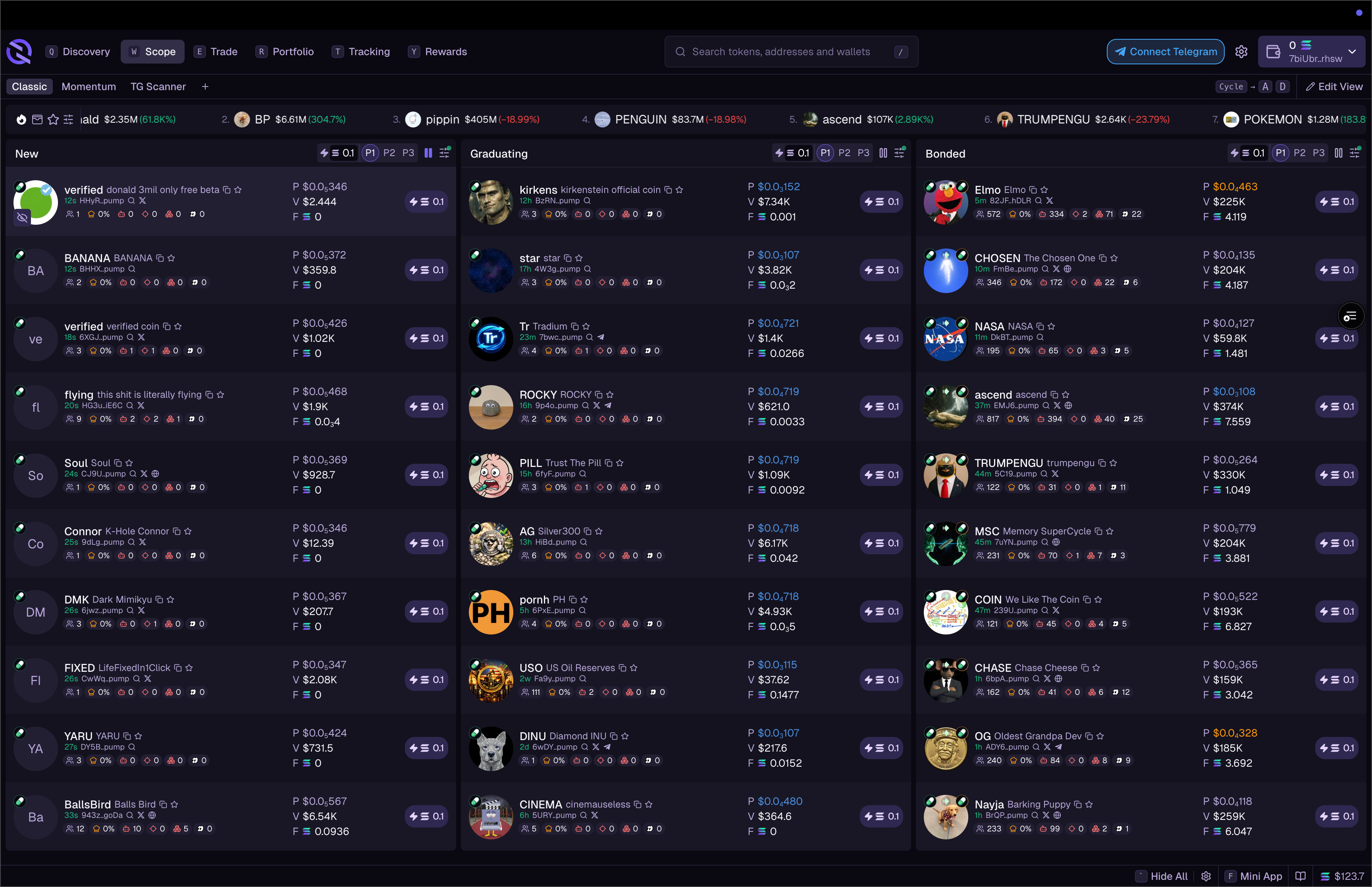 **Tabs:**
* **New** – tokens just launched
* **Graduating** – about to graduate from bonding curve
* **Graduated** – recently graduated tokens
**Features:**
* Real-time updates as tokens launch
* Filter by exchange (Pump.fun, Raydium, etc.)
* Filter by market cap, volume, and other metrics
* Quick buy buttons for instant execution
Create multiple Memescope columns with different filters. One for new launches, one for graduating tokens, one for your specific criteria.
## Listings
Track tokens as they list on different exchanges. See when tokens graduate from Pump.fun to Raydium, or get listed on centralized exchanges.
## Token Watchlist
Create custom lists of tokens you're tracking:
1. Click the star icon on any token to add to watchlist
2. Access your watchlist from the Token Watchlist widget
3. Create multiple watchlists for different strategies
## News Ticker
Scrolling feed of token-related news and social mentions. Configure which sources to include and filter by relevance.
## Tracked Wallets
Follow what successful traders are buying and selling. See their positions, recent trades, and PnL.
**Tabs:**
* **New** – tokens just launched
* **Graduating** – about to graduate from bonding curve
* **Graduated** – recently graduated tokens
**Features:**
* Real-time updates as tokens launch
* Filter by exchange (Pump.fun, Raydium, etc.)
* Filter by market cap, volume, and other metrics
* Quick buy buttons for instant execution
Create multiple Memescope columns with different filters. One for new launches, one for graduating tokens, one for your specific criteria.
## Listings
Track tokens as they list on different exchanges. See when tokens graduate from Pump.fun to Raydium, or get listed on centralized exchanges.
## Token Watchlist
Create custom lists of tokens you're tracking:
1. Click the star icon on any token to add to watchlist
2. Access your watchlist from the Token Watchlist widget
3. Create multiple watchlists for different strategies
## News Ticker
Scrolling feed of token-related news and social mentions. Configure which sources to include and filter by relevance.
## Tracked Wallets
Follow what successful traders are buying and selling. See their positions, recent trades, and PnL.
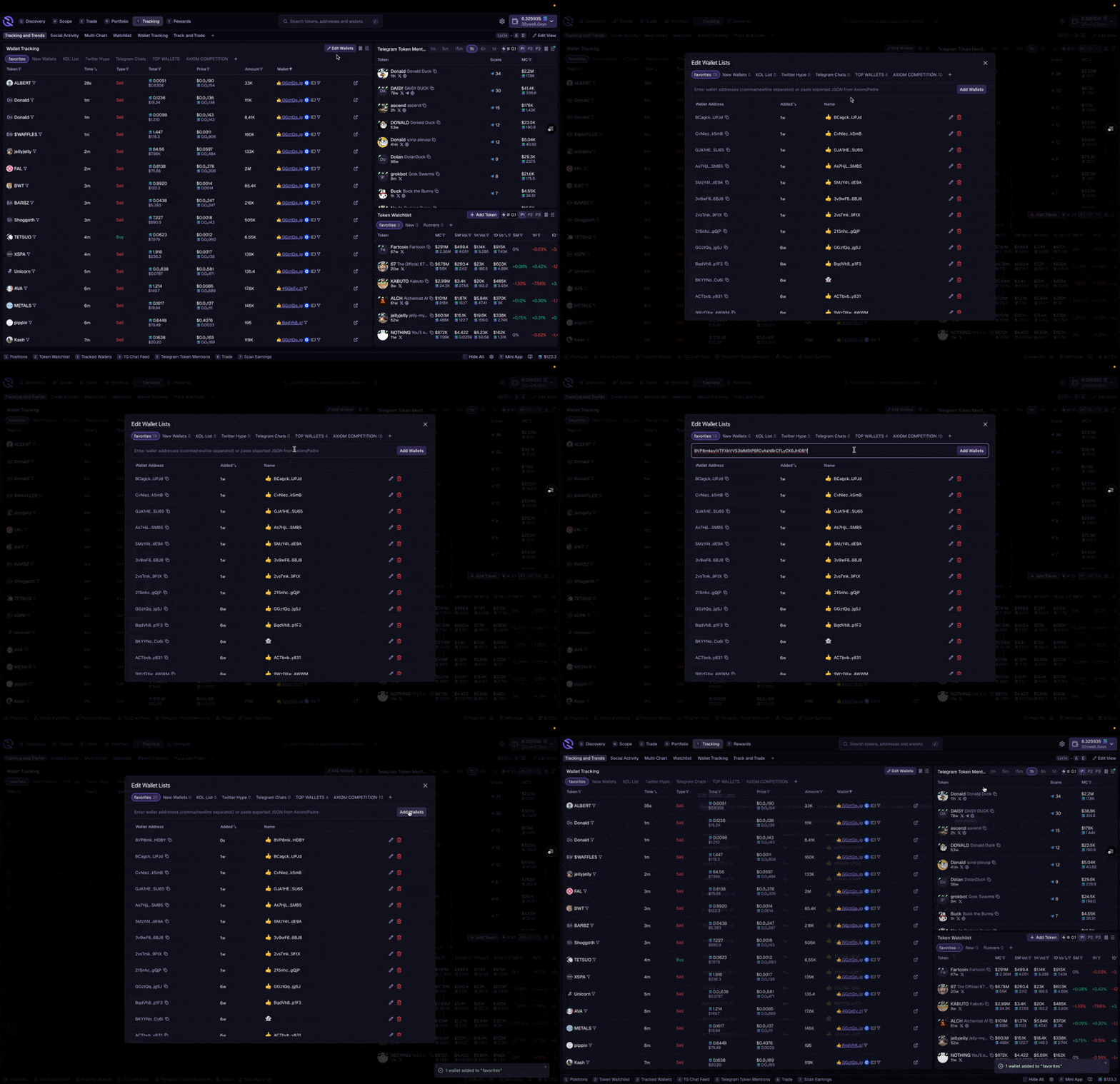 1. Add a wallet address to your tracking list
2. Give it a name and emoji for easy identification
3. View tracked wallet activity in the Tracked Wallets widget
4. See when tracked wallets buy or sell on the chart
Wallet tracking shows public blockchain data. You can track any wallet, but they won't know you're watching.
## Social
View trending tokens and activity from your Telegram groups:
* **Mentions** – trending tokens being discussed on Telegram
* **My Chats** – messages and token calls from your connected groups
* **Scans** – your Telegram scan events
Connect your Telegram account to see social activity integrated into your discovery workflow. See [Telegram Overview](/telegram/overview) for setup.
1. Add a wallet address to your tracking list
2. Give it a name and emoji for easy identification
3. View tracked wallet activity in the Tracked Wallets widget
4. See when tracked wallets buy or sell on the chart
Wallet tracking shows public blockchain data. You can track any wallet, but they won't know you're watching.
## Social
View trending tokens and activity from your Telegram groups:
* **Mentions** – trending tokens being discussed on Telegram
* **My Chats** – messages and token calls from your connected groups
* **Scans** – your Telegram scan events
Connect your Telegram account to see social activity integrated into your discovery workflow. See [Telegram Overview](/telegram/overview) for setup.